
写真から·from a photo
Japanese photo translator
Point your camera at a manga page, a menu or a sign and rikAI will translate Japanese from the picture — vertical text included. Then it does the thing an ordinary image translator cannot: every word on the page stays tappable.
The actual screens
One page, three taps
-
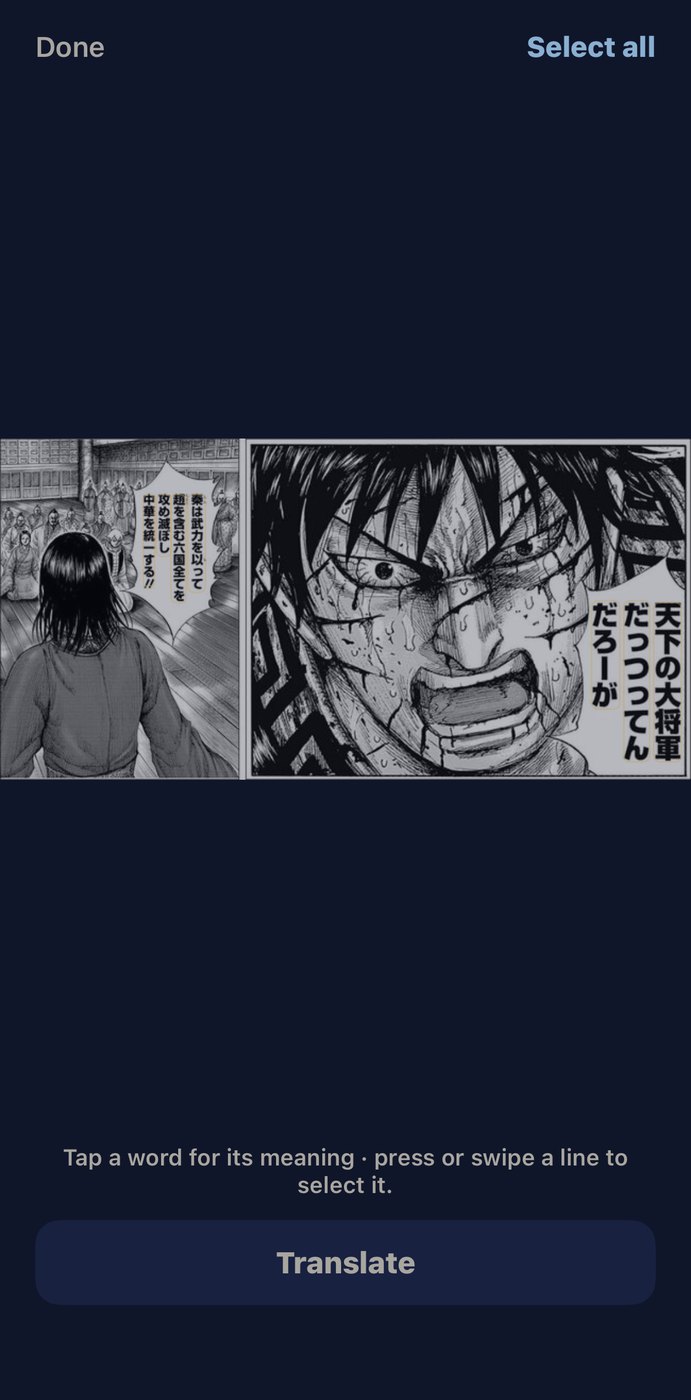
SnapSeven lines found on the page, none of them selected yet. You sweep across the ones you actually want.
-
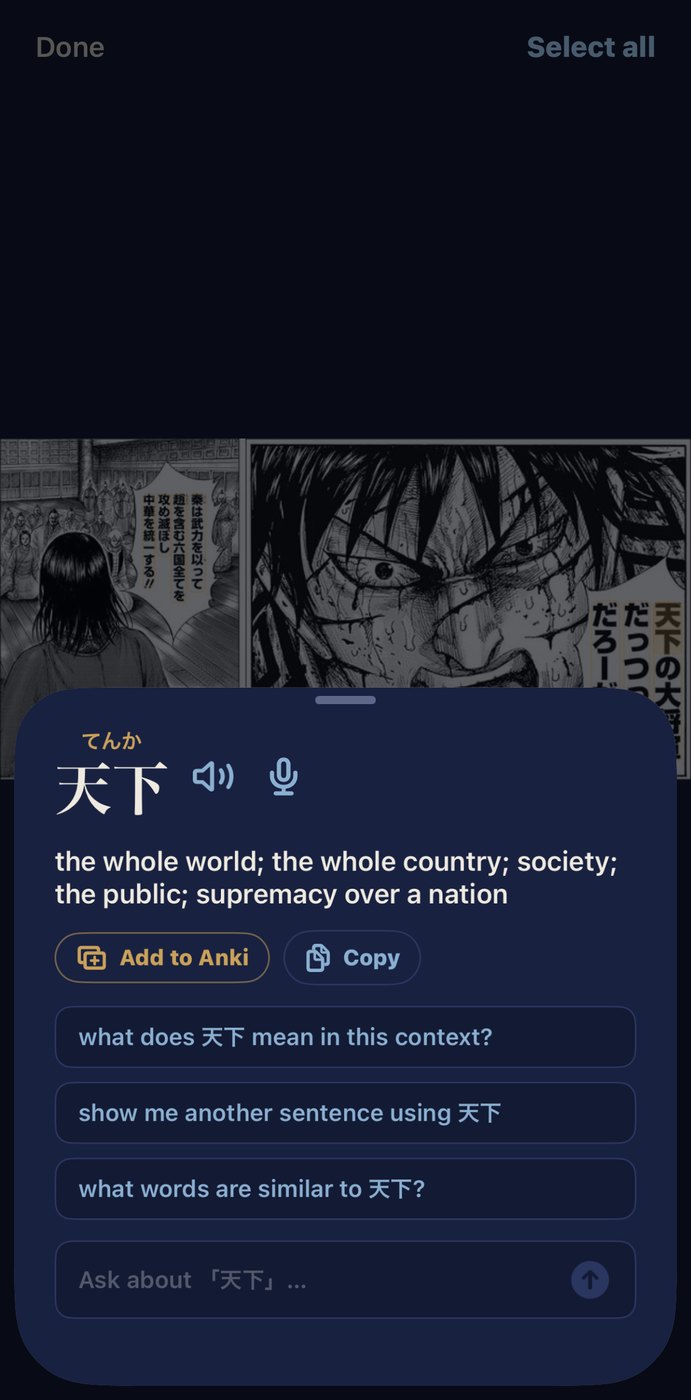
TapReading, meaning, pronunciation, pitch practice and Anki — on top of the photo, so the page never goes away.
-
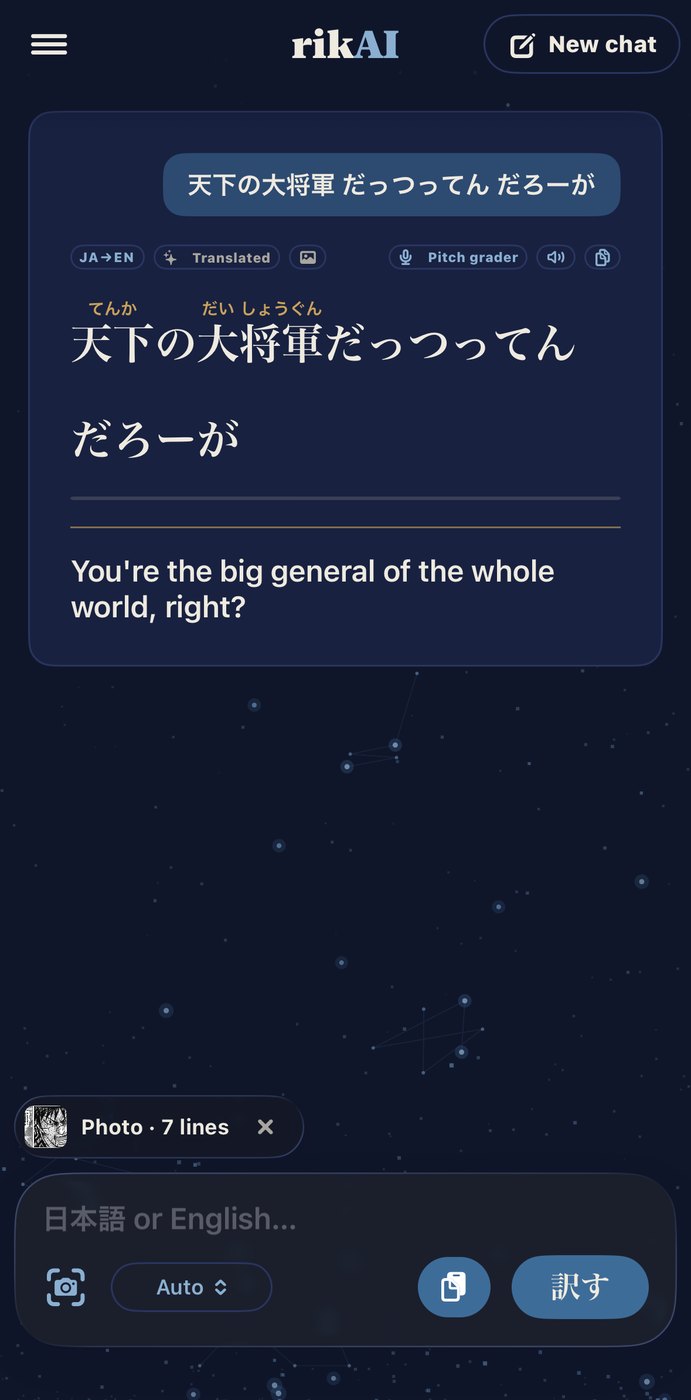
AskThe line comes back with furigana over the kanji and the English under it. The photo stays one tap away on the chip.
What it reads
Vertical and horizontal text support
Vertical & horizontal
Both directions, one shot
rikAI reads vertical Japanese natively — whole columns, right to left, a box around every character, and it stays readable when the photo is taken at an angle. Horizontal text goes through the same pass, so a page that mixes the two — a manga panel with a horizontal sound effect, a menu with a sideways header — comes back as one set of lines in sensible reading order.
Tap any word
The photo stays up. The answers come to you.
Every word in a scanned line opens the same panel the rest of the app uses — over the photo, so you never lose your place on the page.
-
Live definitions
Tap a word and its reading, meaning and pitch accent come up on top of the picture. The reading is the one that token carries, so a homograph is resolved rather than guessed.
-
Furigana over every kanji
Readings sit over the kanji they belong to and no further — 行き gets い over 行 with き left bare, never いき smeared across the whole word.
-
Hear it said
A speaker button pronounces the word, reading the kana rather than the kanji — the one input a synthesizer cannot mispronounce. Optional neural voice for something closer to a person than a phone.
-
Grade your pitch
Say the word back into the mic and get scored on both the sounds and the melody, against the pitch accent the dictionary gives it. The practice strip opens inside the panel — the photo never goes away.
-
Ask about what you see
Each word carries an ask box and suggested questions that change with what you tapped: a particle offers why is this used here?, a verb offers what form is this?. Answers come from the model on the phone.
-
Save for Anki
One button files the word — and the line it came from rides along as the example sentence, so the card keeps the context you found it in. Audio cards require export and import into Anki.
Asked before
Questions about translating Japanese from a photo
- Can rikAI translate Japanese from a picture?
- Yes. Point the camera at a manga page, a menu or a sign, or pick a photo you already have, and rikAI lifts the Japanese off the image and translates it. It goes further than an ordinary image translator: every word it found stays tappable, so you can open any one of them for its reading, meaning and pitch accent without leaving the photo.
- Does it read vertical Japanese text in manga?
- Yes, natively. rikAI reads whole columns right to left, puts a box around every character, and keeps working when the photo is taken at an angle. Horizontal text goes through the same pass, so a page mixing the two — a manga panel with a horizontal sound effect, a menu with a sideways header — comes back as one set of lines in sensible reading order.
- Can I translate a screenshot instead of taking a photo?
- Yes. Alongside the camera there is a photo picker, so anything already in your library — a screenshot of a tweet, a saved manga page, a photo someone sent you — goes through the same recognition pass as a picture you take on the spot.
- Do I need an internet connection to translate a photo?
- Reading and translating the page happen on your phone. Local Ask requires at least 4 GB of memory and an installed reasoning model. Lower-memory phones need optional cloud Ask for questions. If you allow Ask with ChatGPT, it sends recognized text, question context and assistant preferences through Cloudflare to GPT-5 nano. The photo itself is not sent through Ask.
- Does it put furigana over the kanji it finds?
- Yes. The line comes back with furigana over the kanji and the English underneath. Readings sit over the kanji they belong to and no further — 行き gets い over 行 with き left bare, rather than いき smeared across the whole word.
- How is this different from an ordinary image translator?
- An image translator hands you an English blob and the Japanese is gone. rikAI keeps the Japanese: every word stays a target you can tap for its reading, its meaning, its pitch accent, a pronunciation you can hear, and a question box for whatever is still unclear — and you can save the word for Anki with its source sentence. Compatible text cards can go directly to AnkiMobile; audio cards need export and import.
Where the photo goes
Nowhere
Text recognition and translation run on your phone. The photo itself is not sent through cloud Ask. If you enable Ask with ChatGPT, recognized text, question context and assistant preferences are shared with Cloudflare and OpenAI. Privacy details.
Join the waitlistAll features · Japanese reading practice · Pitch accent practice · How the models work