
読解·reading
Japanese reading practice
Read real Japanese — a manga page, a news article, a line someone sent you — with furigana over the kanji and every word one tap from its reading, its meaning and the grammar holding it together. You bring the text. rikAI makes it readable.
本を読んでみたら、思ったより面白かった。
おもったより
思ったより
than I expected · more than I thought
Grammar · 〜より comparison after a plain-past verb N4
The actual screens
Read, tap, keep it
Reading practice only works if looking a word up costs nothing. In rikAI the lookup happens on the sentence you are already reading, and the word you looked up leaves with you.
-
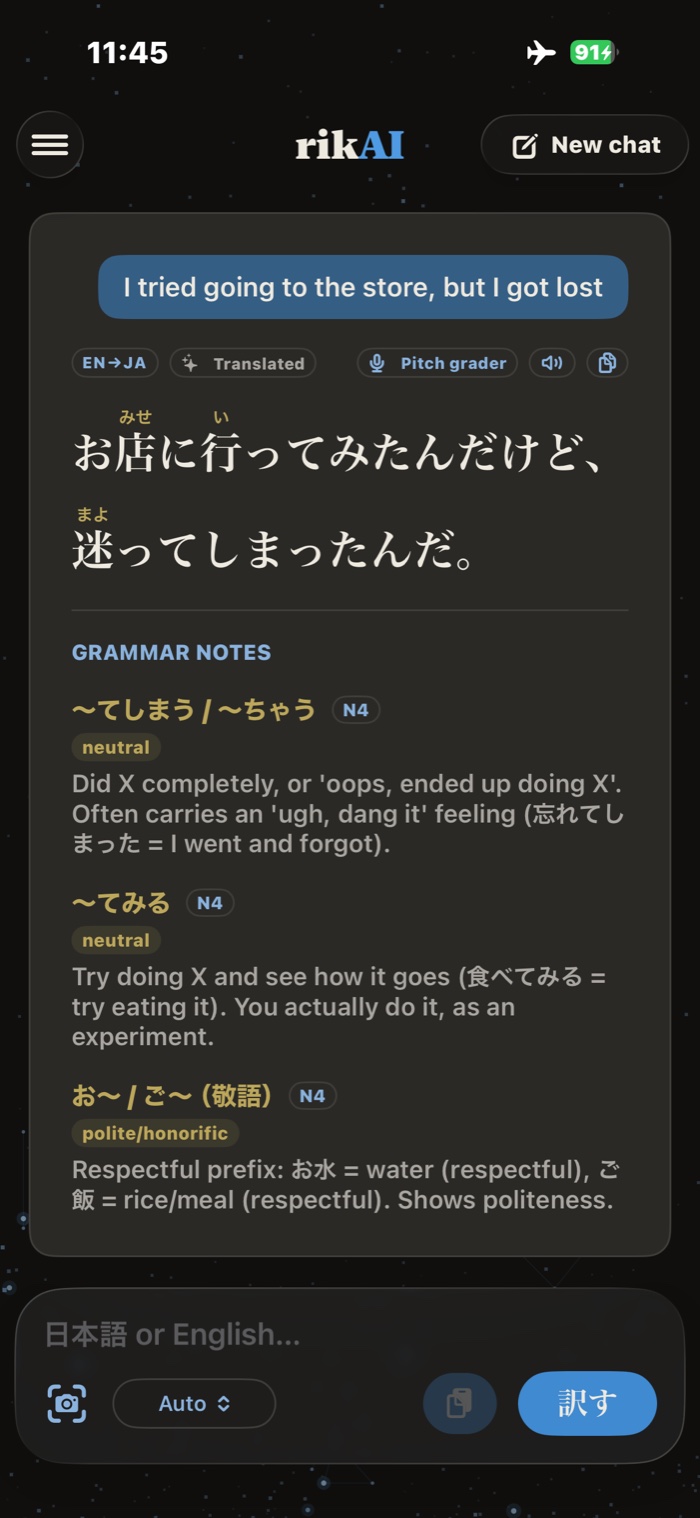
ReadFurigana over the kanji and the grammar already matched — here 〜てしまう and 〜てみる, both N4.
-
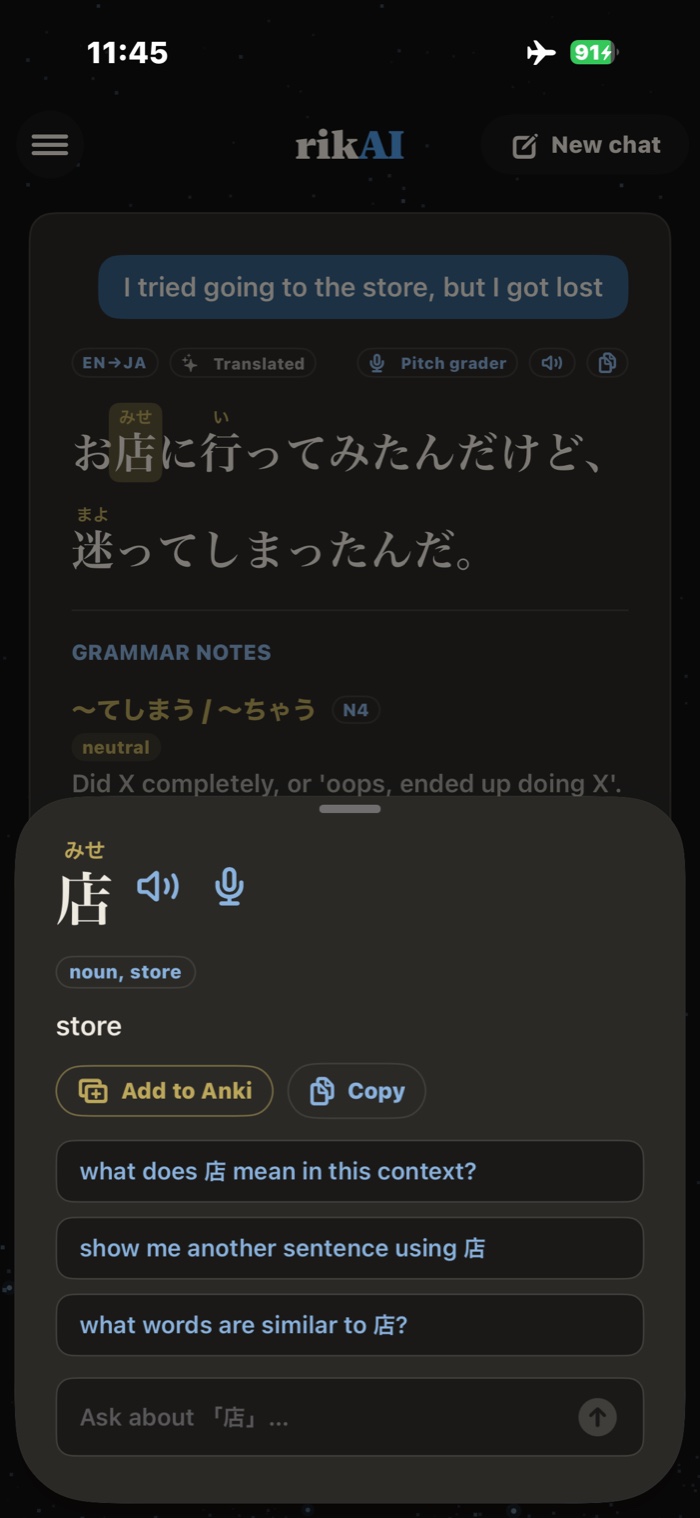
TapReading, meaning, part of speech — and the question you were about to ask, already written.
-
![The finished card in AnkiMobile: 店 on the front; on the back みせ, four senses, the sentence it came from with its English, and the pitch accent みせ[2] with audio.](/img/app-card.jpg)
StudyThe card in AnkiMobile, with the sentence you met the word in — the context is what makes it stick.
What you can read
You bring the Japanese
Three ways in
Photograph it, paste it, type it
Point the camera at a manga page, a menu, a sign or a paperback and rikAI reads it on the device — vertical text included. Paste a block from a browser, a message or a subtitle file. Or type the line you half remember. Whatever comes in gets the same treatment: split into real words, furigana over the kanji, grammar matched, every token tappable.
What rikAI does not do is hand you something to read. There is no library of graded readers here and no daily article feed — the reading material is yours, and the app is what you read it with. If you want that material, NHK News Web Easy and the tadoku graded readers are free and excellent; bring a page of either.
Furigana
Readings over the kanji, sized to the word
Most furigana tools work one character at a time and read 行き as いき smeared across both glyphs. rikAI splits the sentence into words first, so the reading lands where it belongs.
Character by character
行き
The whole reading dumped on the kanji, the okurigana ignored.
rikAI
行き
い over 行, き left bare — what a printed book does.
Homographs are resolved by the word, not the spelling: the 生 in 生ビール is なま and the one in 先生 is せい, and rikAI reads them that way because it knows which word it is looking at. Furigana is on by default and can be switched off in Preferences the day it starts feeling like training wheels.
On every word
The whole lookup, without leaving the sentence
-
Grammar matched as you read
Patterns in the sentence are named underneath it with their JLPT level, so 〜てしまう stops being noise between the words you know. A floor you set from N5 to N1 keeps the notes you have outgrown out of the way.
-
Pitch accent, not just reading
Every word carries its accent pattern from the dictionary, drawn as the line the voice takes. Reading practice that never mentions pitch teaches you to read words you will still say wrong.
-
Hear it said
A speaker button pronounces the word from its kana, so a synthesizer cannot pick the wrong reading. An optional neural voice makes it a person rather than a phone.
-
Say it back
Read the line into the mic and get scored on the sounds and the melody against the accent the dictionary gives it. Reading out loud is the part most reading apps leave to you.
-
Ask about the line
Anything the panel does not cover has an ask box under it, with suggested questions that change with what you tapped — a particle offers why is this used here?, a verb offers what form is this?. The model answering lives on the phone.
-
Save for Anki
Save the word with its meanings, pitch accent and source sentence. Send compatible text cards to AnkiMobile, or export audio cards and import them in AnkiMobile or desktop Anki.
Asked before
Questions about reading with rikAI
- How do I practise reading Japanese if I can't read kanji yet?
- Read with furigana on. rikAI puts the reading in hiragana above every kanji, sized to the word rather than the character, so you can read a sentence out loud before you can recognise a single kanji in it. Tapping the word gives you its meaning as well, and furigana can be switched off in Preferences once you stop needing it.
- Does rikAI give me Japanese texts to read?
- No. rikAI has no library of graded readers or news articles — you bring the Japanese. Photograph a page, paste a block of text, or type it, and rikAI turns whatever you brought into something readable. If you want a reading list, a site like NHK News Web Easy or a tadoku graded reader is the right tool; rikAI is what you read it with.
- Can I use rikAI to read manga in Japanese?
- Yes. Photograph the page and rikAI reads vertical Japanese natively, right-to-left column order included, then makes every word on the panel tappable. Furigana appears over kanji that the printed page leaves bare, and the panel opens on top of the photo so you never lose your place. That flow has its own page.
- Does Japanese reading practice in rikAI work offline?
- The dictionary, grammar notes and pitch data work on-device. Local Ask requires at least 4 GB of memory and an installed reasoning model. Lower-memory phones need optional cloud Ask for questions. If you allow Ask with ChatGPT, selected text, recent context and assistant preferences are shared with Cloudflare and OpenAI. Online readers, cloud Ask and downloads need internet.
- Can I stop rikAI explaining grammar I already know?
- Yes. Grammar notes are filtered by a JLPT floor you set in Preferences, from N5 to N1. Set it to N3 and the notes on N5 and N4 patterns stay out of the way; only N3 and harder are called out in what you read.
- Can I send words from my reading to Anki?
- Yes. Save the tapped word with its meanings, pitch accent and source sentence. Compatible text cards can go directly to AnkiMobile after setup; audio cards are exported as an Anki package for import in AnkiMobile or desktop Anki.
Where the text goes
Local tools, optional cloud Ask
Translation and dictionary tools run on your phone. If you allow Ask with ChatGPT, selected text, recent conversation and assistant preferences go through Cloudflare to OpenAI. Cloud Ask is off by default. See our privacy policy.
Join the waitlist